Use Cases
End-to-end walkthroughs for representative scientific and data-readiness scenarios are located in use_cases/. Each follows one layout (Prerequisites, Setup, Execution as pasted prompts with expected results, Post-Conditions, Coverage, Cleanup) and covers data acquisition, code or skill registration, pipeline construction, and agent-driven execution. Some run on real scientific datasets; the skill-management demos use small fixture data.
Fixture data of a few megabytes is in the use case's own data/ folder in the repository; larger datasets are hosted in the DSAgt use-case data folder, and each Setup section gives the copy or download command.
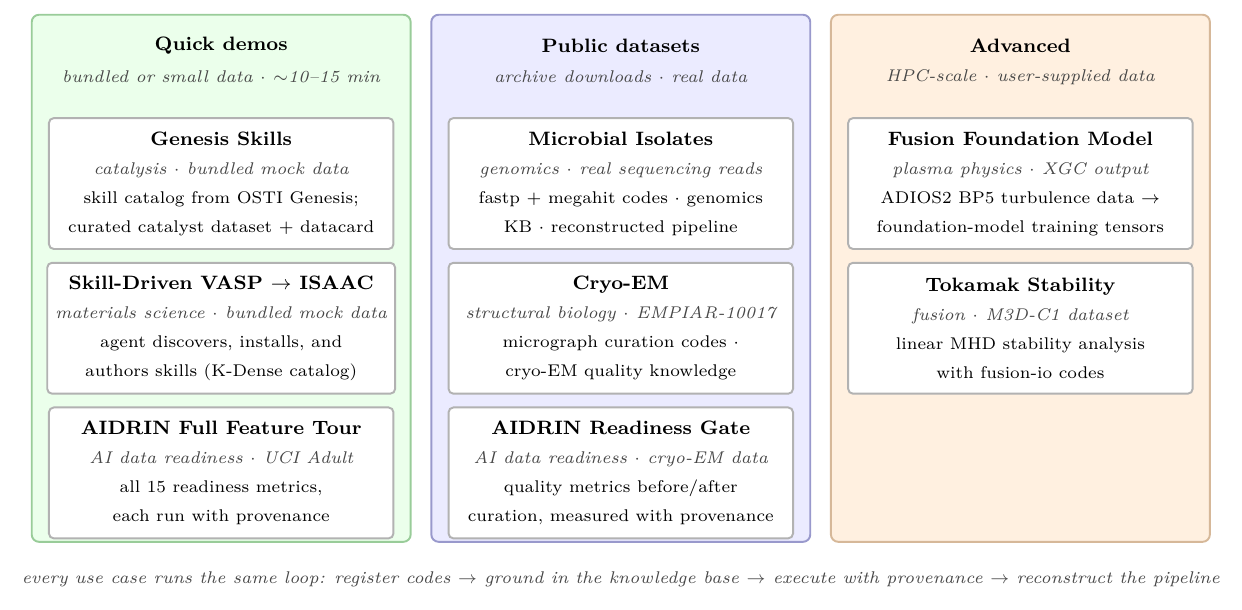
| Use case | Domain | Summary |
|---|---|---|
| Microbial Isolates | Genomics, short-read QC and assembly with fastp + megahit |
Register short-read QC and assembly codes, follow the genomics best-practice documents, and build a reproducible isolate-processing pipeline against real sequencing reads. |
| Cryo-EM | Structural biology, EMPIAR-10017 β-galactosidase micrographs via CryoPPP | DSAgt-assisted curation of cryo-EM data from the EMPIAR public archive (EMPIAR-10017 β-galactosidase micrographs via CryoPPP): register curation codes, ingest cryo-EM quality knowledge, and build a micrograph-preprocessing pipeline, with the AIDRIN AI-readiness check measuring the curation step before/after. |
| VASP DFT → AI-Ready Records | Materials science, VASP DFT output to AI-ready records, via catalog skills and a registered code | Convert VASP DFT output into AI-ready records: the agent discovers and installs a pymatgen skill from a catalog, authors a converter skill for a slab calculation, extends it to nudged-elastic-band calculations, registers that converter as a code, and runs it with provenance against a reference record (no DFT run, no HPC). |
| Tokamak Stability | Fusion energy, M3D-C1 finite-element simulation data | Register codes for reading, analyzing, and visualizing data from the M3D-C1 finite-element code, then use DSAgt to explore an example linear-MHD dataset, produce plots and spectra, repackage secondary data products as HDF5, and reconstruct the session as a script that reruns on other datasets. |
| AIDRIN | AI data readiness, aidrin metrics (quality, fairness, privacy) on UCI Adult |
Apply AIDRIN through DSAgt to a single tabular dataset (UCI Adult), 15 metrics spanning data-quality, impact-on-AI, fairness-and-bias, and data-governance. |
| Genesis Skills for Data Curation | Skill management, the external Genesis skill catalog driving a data-curation pipeline | Sync the Genesis skill catalog, install the Croissant validation skill, ground the curation skills in the dataset's domain documents, and produce a datacard for a small curated dataset. |
| Plasma Turbulence Training Data (XGC) | Plasma physics, gyrokinetic turbulence simulation (XGC) training-data prep | Register the XGC preprocessing scripts as codes and drive them through DSAgt with provenance: check an ADIOS2 BP5 simulation case, summarize its physics content, preprocess it into GNN-ready npz files, validate the output, and reconstruct the pipeline. Advanced, HPC-scale data. |
| BlastNet → WELL Conversion | Combustion CFD, BlastNet DNS trajectories to the WELL HDF5 format | Develop a BlastNet-to-WELL converter from the format documents: author a conversion skill that carries the specifications as references, register the agent-written converter and a checker as codes, convert a sample trajectory with provenance, and compare the result with a reference WELL file held back from the agent, fixing the converter until the two match exactly. |
Each use-case folder is laid out by role: README.md is the walkthrough; data/
holds fixture data small enough to keep in the repository; docs/
holds documents the agent reads; scripts/ holds code copied into the project;
skills/ holds skills copied into the project; reference/ holds expected outputs
and reference solutions that are not inputs to the demo. Only the folders a use case
needs are present.
Dependencies follow one rule per kind. Python packages from PyPI that a walkthrough
needs are an extra of dsagt named after the walkthrough (vasp-dft,
combustion-simulation, tokamak-stability, plasma-turbulence), so
pip install "dsagt[<use-case>] @ git+https://github.com/AI-ModCon/dsagt.git"
installs them with dsagt (uv sync --all-extras in a checkout). Anything else (conda-only tools, libraries built
from source) is installed by the use case's scripts/setup_env.sh into
~/dsagt-projects/.tools/<use-case>/, a shared tools directory beside the projects;
the README's Prerequisites list what the script installs and what it needs already
present. Larger data comes from the Google Drive folder linked above.
Adding a use case
Drop a README.md with frontmatter (title, domain, summary) into a
use_cases/<name>/ folder; it is added to this table, its body is
inlined as its own page, and it appears in the nav. A folder without
frontmatter is left out. See
hooks/gen_use_cases.py.