DSAgt
DataSmith Agent, an AI-assisted data pipeline builder.
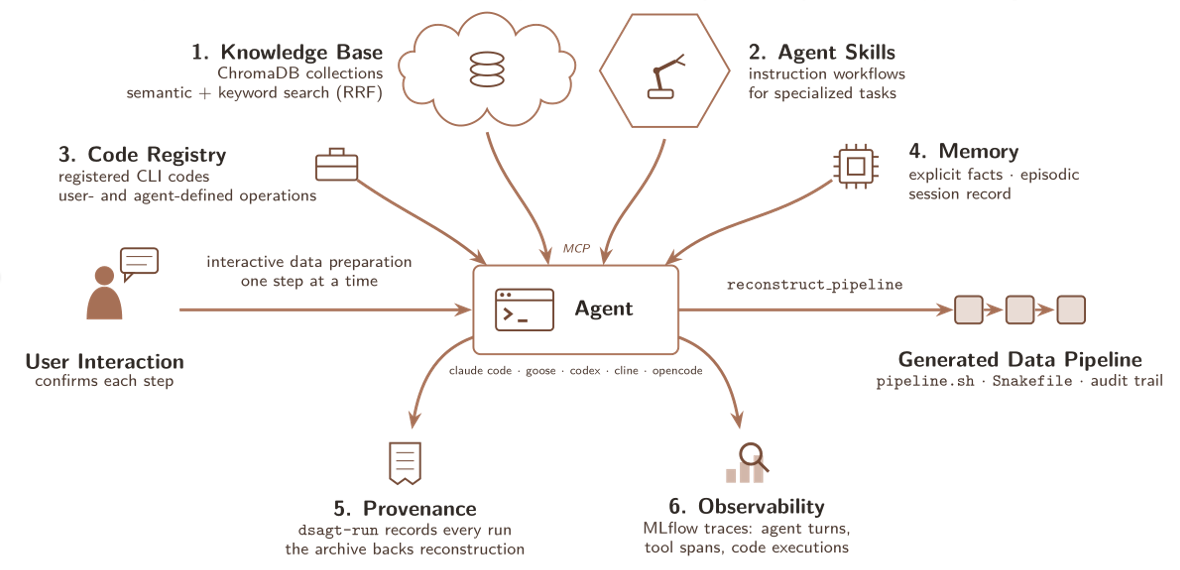
DSAgt connects an MCP-compatible AI coding agent to code registration, a semantic knowledge base, skills discovery and creation, execution provenance, and observability infrastructure. It exposes these capabilities to a user's existing agent CLI or VS Code extension (Claude Code, OpenCode, Codex, and others).
Prerequisites: Python 3.12 or later (CI tests 3.12 and 3.13) on Apple Silicon or Linux x86_64 (onnxruntime, which runs the local embedding model, has no Intel Mac wheel), and one of the agent platforms below, installed and authenticated against the LLM provider you intend to use.
| Agent | Install | Verify |
|---|---|---|
| Claude Code | npm i -g @anthropic-ai/claude-code |
claude --version |
| Goose | See Goose docs | goose --version |
| Codex | npm i -g @openai/codex (or brew install --cask codex) |
codex --version |
| opencode | See opencode docs | opencode --version |
| Cline | npm i -g cline |
cline --version |
Installation
python3.13 -m venv ~/.venvs/dsagt          # or: conda create -n dsagt python=3.13 && conda activate dsagt
source ~/.venvs/dsagt/bin/activate         # (Windows venv: ~\.venvs\dsagt\Scripts\activate)
pip install "git+https://github.com/AI-ModCon/dsagt.git"
dsagt --version                            # 0.2.1
This puts the dsagt CLI on your PATH. Create your first project. dsagt init is interactive (it prompts for the agent platform, project location, packaged knowledge collections, and skill sources) and sets up the knowledge base on first run:
Then start dsagt (shorthand for starting your agent with the dsagt MCP server enabled), or open the project in VS Code:
With a VS Code agent extension, open the folder as a project in VS Code and start the agent; dsagt init has already written the dsagt MCP server into the agent's native config (for Claude, the project's .mcp.json).
To upgrade later, reinstall; re-running dsagt init reconfigures an existing project in place:
Pin to a specific release: e.g.
pip install "git+https://github.com/AI-ModCon/dsagt.git@0.2.0".
For a development install from a clone, see the Developer Guide.
Capabilities
| Capability | Description |
|---|---|
| Code Registry | Register CLI codes as markdown specs; the agent discovers them via search_registry and runs them from its shell |
| Knowledge Base | Hybrid semantic + keyword (BM25) search over indexed ChromaDB collections |
| Skills Discovery | Search the external skill corpus and install workflow skills on demand via search_skills / install_skill; an uninstalled skill takes no space in the agent's context |
| Provenance | dsagt-run wrapper records every code execution to trace_archive/; reconstruct_pipeline renders it as a runnable script |
| Explicit Memory | User-confirmed facts persisted to YAML and the knowledge base |
| Episodic Memory | Opt-in: the MCP server chunks and embeds each session turn into a searchable session_memory collection (recency-weighted retrieval) |
| Observability | Serverless MLflow tracing (a per-project SQLite file): DSAgt's own spans plus agent traces recovered from the on-disk transcript |
The Quick Start exercises all of these in a single session.